Hello there,
I am trying to set up Everdo portable on my PC after upgrading to 1.11.12. It came with the tutorial tasks.
Steps I took: I logged into encrypted sync. I added my pro key (on the desktop app).
Now: I realised that there are several of the pre-defined areas (work, home), which I wanted to delete. (I use four areas myself and I had seven.) After deleting the redundant work, Work and home areas, I realised that my fourth area (completely different and unrelated name) is also gone.
An immediate clean pull restores it, but then I get the redundant areas back again as well.
Looks like a bug to me.
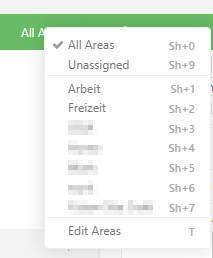
Screenshot: deleting areas four, five and six deletes area seven as well. (Areas 1,2,3 and 7 are mine.)