Taskbar Pin Shows Correct Icon, but Running Instance Displays Generic Icon (Linux Mint 22.1 / AppImageLauncher)

Environment

  • Everdo version: 1.11.11

  • OS: Linux Mint 22.1 Cinnamon

  • Installation method: AppImageLauncher

Description

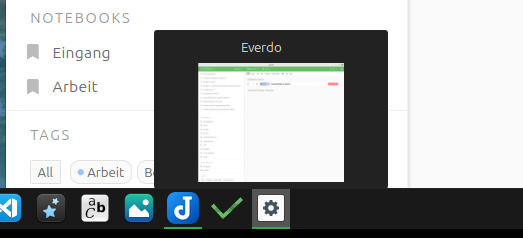
When pinning Everdo to the Cinnamon taskbar via AppImageLauncher, the pinned shortcut shows the correct icon. But once launched, a second taskbar entry appears with a generic gear icon. The two don’t merge.

The culprit is likely a StartupWMClass mismatch in the generated .desktop file. Running xprop WM_CLASS on the active Everdo window returns:

WM_CLASS(STRING) = "everdo", "everdo"

So the .desktop file should contain:

StartupWMClass=everdo

Comparison

Joplin, also installed as an AppImage on the same machine, with AppImageLauncher, works correctly. So this is specific to Everdo, not a general AppImageLauncher or Cinnamon issue.

See attached screenshot.

Hey, thanks for flagging!

Did this first occur in 1.11.11?

Were you able to make it work by editing the .desktop file?

Hi Andrei

Did this first occur in 1.11.11?

No, it occurred from the first use of the AppImage; I think it was version 1.9.x or something.

Were you able to make it work by editing the .desktop file?

Yes, I changed the following entry: StartupWMClass=Everdo (uppercase) to StartupWMClass=everdo (lowercase) and it works as expected.

Image of the working fix:

grafik

Thanks for the info, I’ll see how to do it on my end

1 Like

Can you please try the new 1.11.12 version? The issue seems to be fixed as far as I can tell.

I installed Everdo-1.11.14.appimage with AppImageLauncher in Linux Mint 22.3 and the integration of the symbols and launchers into Cinnamon worked flawlessly.
Thank you DidierCH and Andrej!
:waving_hand: :slightly_smiling_face: Fritz

1 Like

I just installed Version 1.11.14 AppImage on Linux Mint and it looks good. Thank you!